Table of contents
Tone-Tag
CatCore has a static list of tone tags that were curated by the developers, if you feel a tone tag is missing please join the support server and ping soneone with the dev role.
Tone Tag
Context Menu Command
This command can be activated by right clicking a message on the desktop client, it will resolve the tone tags in a message and show them to you with a fancy embed.
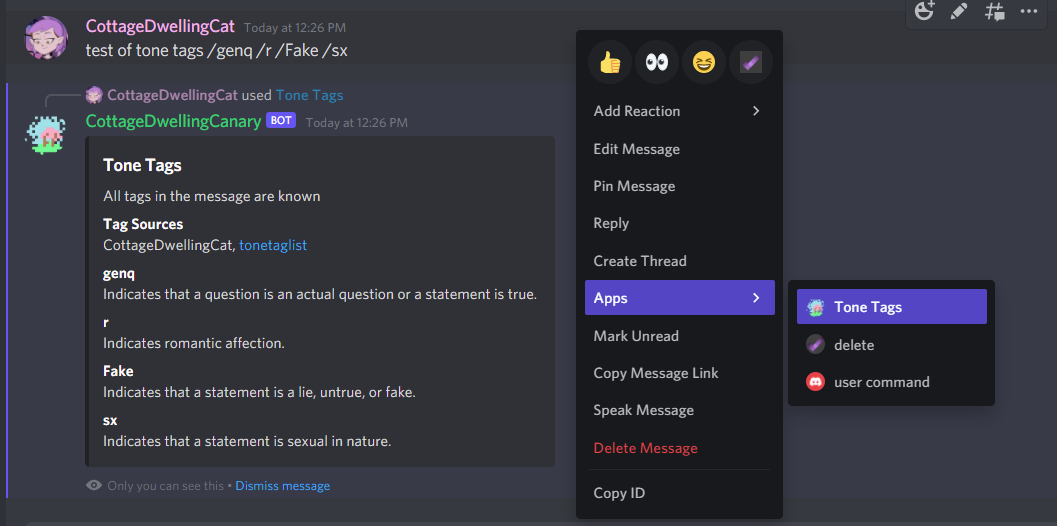
Tone-Tag resolve
Slash Command
Temporary
/tone-tag resolve <message-id>
| arg | type | use |
|---|---|---|
| message-id | int | An ID from a message in the channel you ran the command |
This command will resolve tone tags in a specific message, in order to specify the message to get tags from you need to copy it’s ID, you can learn more about message Id’s here, and figure out how to copy them here. This command needs to be run in the channel the message was sent in. This command will be removed when Context Menu Commands are available on mobile. This command has an identical responce to Tone Tag
Tone-Tag Search
Slash Command
/tone-tag search <tag>
| arg | type | use |
|---|---|---|
| tag | Tone Tag | A tone tag to load the defintion for. |
This command allows you to search the database of tone tags to find the perfect one for every situation. It supports searching names (like Genuine), aliases (like gen), and definitions (most of the time anyway).